Field teams couldn't afford to lose data just because they lost signal.

Field teams couldn't afford to lose data just because they lost signal.

Field teams couldn't afford to lose data just because they lost signal.

Introduction

Introduction

Coolfire Core is work management software built for fast-moving field operations. Teams across logistics, telecommunications, field service, and government use it to coordinate tasks, workflows, and real-time communication across HQ and the field. Offline Mode was built for the teams operating where connectivity couldn't be guaranteed.

Company

Coolfire Solutions

Year

2022

Platform

Mobile Application Feature

Role

Product Design • UX/UI

Scope of work
Offline Mode • State Management • Mobile Feature

Offline Mode • State Management • Mobile Feature

The Problem

The Problem

Coolfire Core's field users frequently operated in low or zero connectivity environments. Without a reliable offline solution, the risk of losing session data mid-job was real. Teams fell back on paper forms to protect themselves, which created its own problems. Data entry errors, workflow inefficiencies, lost updates, and delayed reporting all traced back to the same root cause.

The challenge wasn't just building an offline mode. It was designing a system where users always knew exactly what was saved, what was synced, and what still needed to go. Ambiguity around data status wasn't acceptable when field work depended on it.

Coolfire Core's field users frequently operated in low or zero connectivity environments. Without a reliable offline solution, the risk of losing session data mid-job was real. Teams fell back on paper forms to protect themselves, which created its own problems. Data entry errors, workflow inefficiencies, lost updates, and delayed reporting all traced back to the same root cause.

The challenge wasn't just building an offline mode. It was designing a system where users always knew exactly what was saved, what was synced, and what still needed to go. Ambiguity around data status wasn't acceptable when field work depended on it.

In the field, lost data isn't an inconvenience. It's a failed job.

In the field, lost data isn't an inconvenience. It's a failed job.

A large group photo of diverse team members gathered in an industrial-style space with arched ceiling.

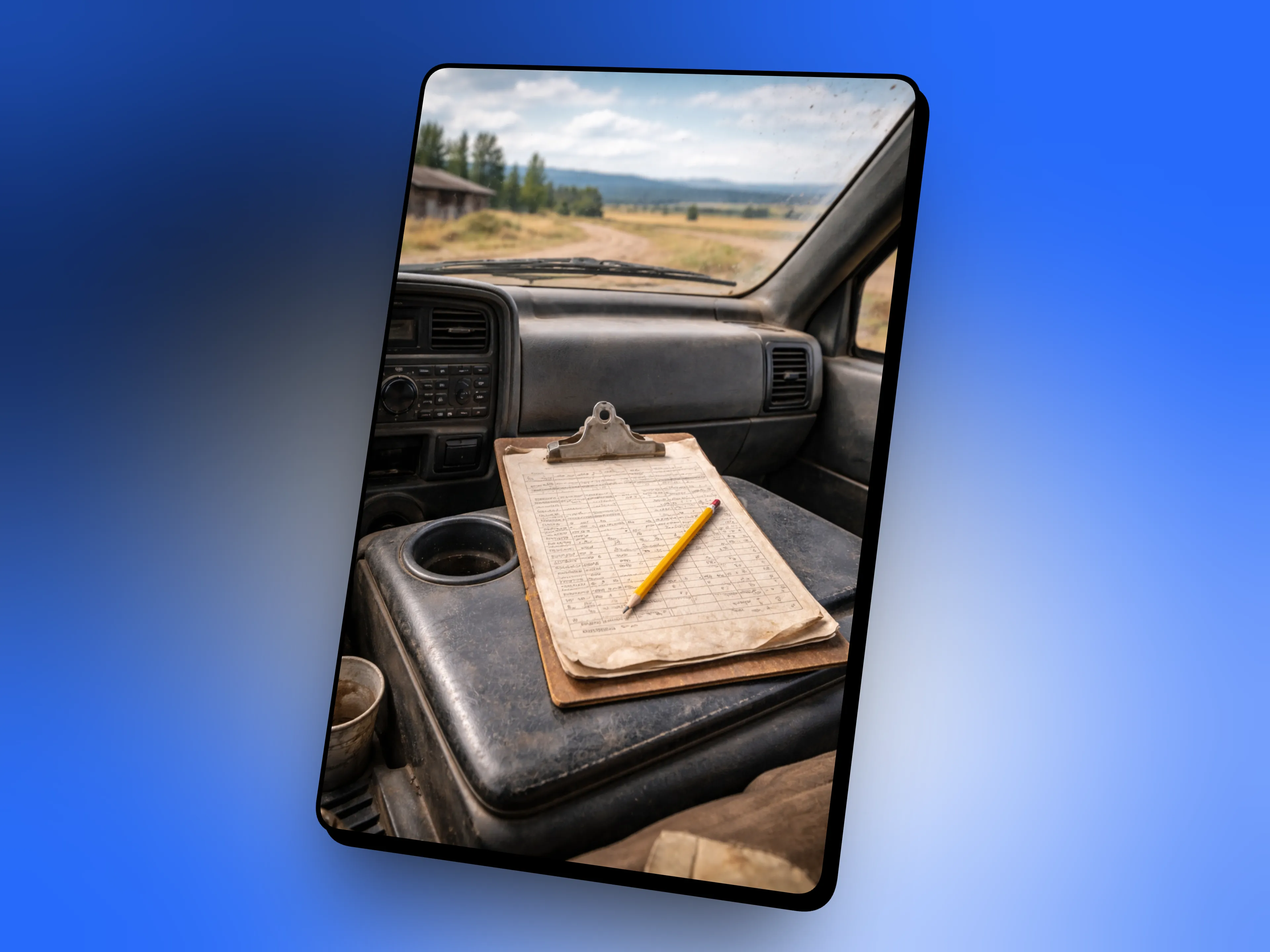
Paper form and clipboard on a work truck console, the fallback field workers relied on before Offline Mode.

My Role

I owned this project end-to-end as the sole designer on the team. That meant going from problem definition to beta release in four weeks, research, design, and handoff all running in parallel rather than in sequence.

Research came directly from Customer Success and beta clients who were already dealing with the problem in the field. That first-hand feedback replaced a formal discovery phase and kept the work grounded in real failure scenarios rather than hypothetical ones.

From there I worked closely with engineering throughout, not just at handoff. The offline state logic was complex enough that design and development decisions had to happen together. Retry states, confirmation dialogs, and failure handling were figured out collaboratively.

Concept to beta in 4 weeks. Research, design, and engineering running in parallel the whole way.

0

01

Sole designer

0weeks

02

Concept to beta release

A large group photo of diverse team members gathered in an industrial-style space with arched ceiling.

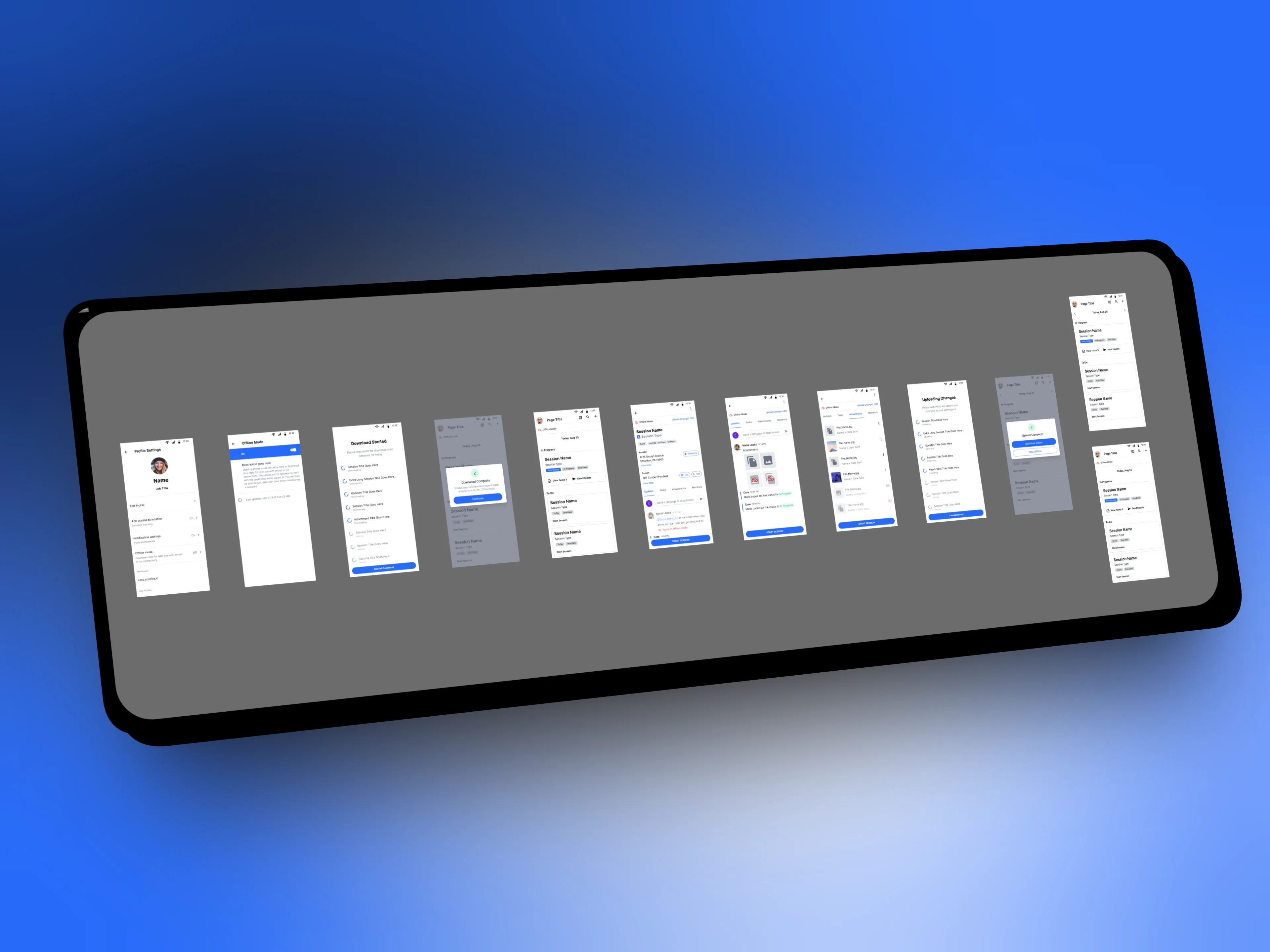
Full offline mode user flow showing all states designed across the feature.
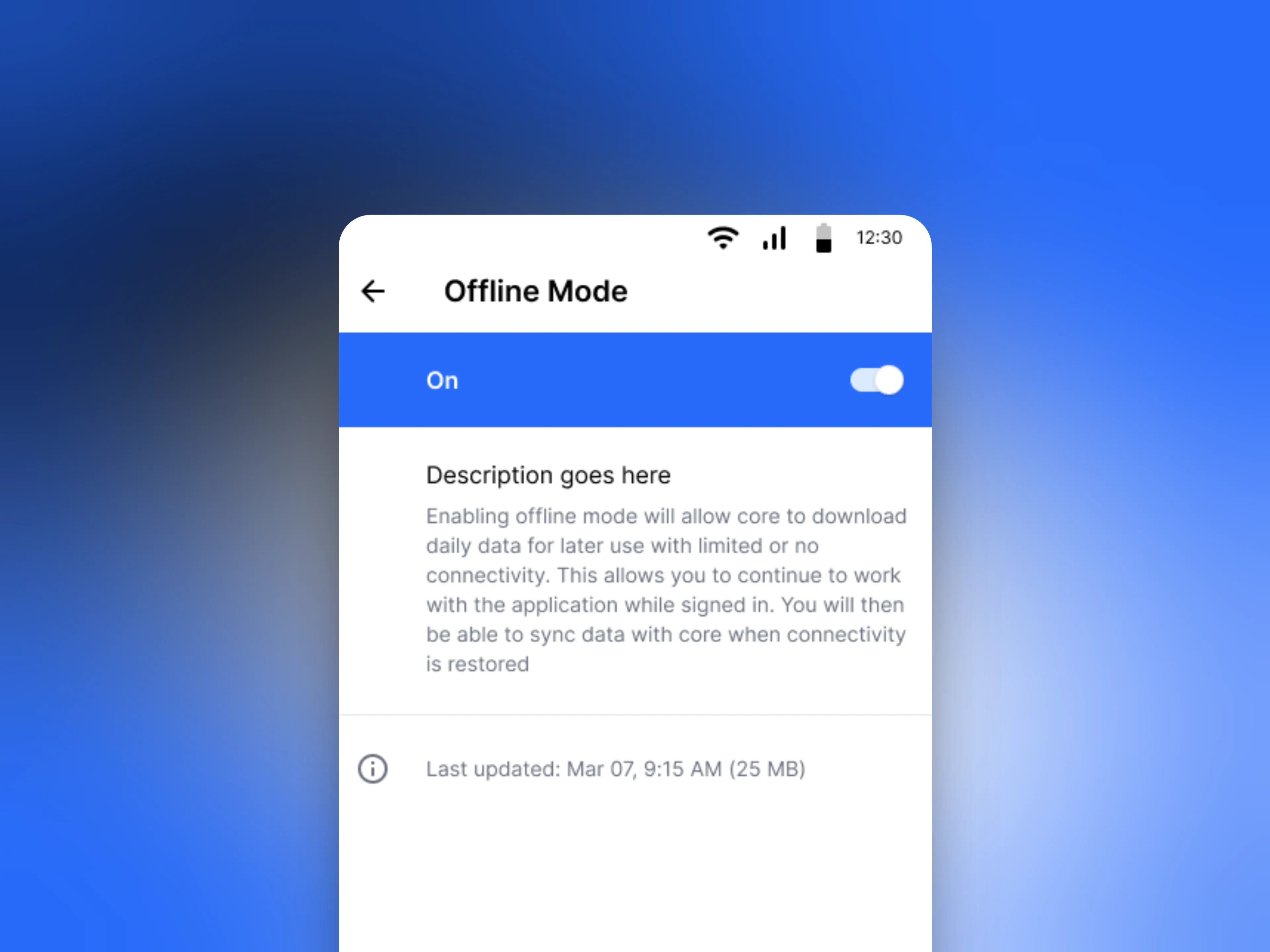
A large group photo of diverse team members gathered in an industrial-style space with arched ceiling.

Offline Mode settings screen where users enable the feature.

Collaborators

Collaborators

Engineering Team

Close collaboration throughout, not just at handoff. The complexity of offline state logic meant design and development decisions had to happen together, not in sequence.

Customer Success

The primary research source. Their direct line to field users surfaced the real failure scenarios that defined the requirements before a single screen was designed.

Product Manager

Scope, prioritization, and alignment across the team. Kept the four-week timeline on track and ensured the right decisions got made at the right time.

Beta Clients

Field users already dealing with the problem. Their first-hand feedback validated the approach and caught edge cases that internal testing would have missed.

Engineering Team

Close collaboration throughout, not just at handoff. The complexity of offline state logic meant design and development decisions had to happen together, not in sequence.

Product Manager

Scope, prioritization, and alignment across the team. Kept the four-week timeline on track and ensured the right decisions got made at the right time.

Customer Success

The primary research source. Their direct line to field users surfaced the real failure scenarios that defined the requirements before a single screen was designed.

Beta Clients

Field users already dealing with the problem. Their first-hand feedback validated the approach and caught edge cases that internal testing would have missed.

Offline Mode was a small, focused effort. The people closest to the problem, in the field and on the engineering side, shaped every decision.

Approach

Approach

Principles first

Good design doesn't start with screens. It starts with understanding the problem well enough that the right solution becomes obvious.

Order from Chaos — Four states. One clear system. No room for ambiguity.
icon

Before designing a single screen, every possible data state had to be mapped, downloading, downloaded, uploading, uploaded, failed. The system only works if users always know exactly where their data stands. Structure had to come before interface.

No Wasted Pixels — Every indicator on screen was load-bearing.
icon

In a low-connectivity environment, visual feedback isn't decoration. The offline banner, the sync indicators, the progress states, each one existed because a field worker needed to make a real decision based on what it said. Nothing on screen was there for aesthetics.

Built to Last — Designed for the edge cases, not just the happy path.
icon

The easy version of offline mode handles a clean download and a clean upload. The real version handles failed syncs, partial uploads, and reconnection mid-session. Designing retry states and failure handling upfront meant the system held up when things didn't go as planned.

Earned Trust — A field worker has to trust the app before they'll abandon paper.
icon

The only way to replace paper forms was to make the digital system more reliable than paper. That meant no silent failures, no ambiguous states, no guessing whether data was safe. Trust had to be earned through absolute clarity.

Order from Chaos — Four states. One clear system. No room for ambiguity.
icon

Before designing a single screen, every possible data state had to be mapped, downloading, downloaded, uploading, uploaded, failed. The system only works if users always know exactly where their data stands. Structure had to come before interface.

No Wasted Pixels — Every indicator on screen was load-bearing.
icon

In a low-connectivity environment, visual feedback isn't decoration. The offline banner, the sync indicators, the progress states, each one existed because a field worker needed to make a real decision based on what it said. Nothing on screen was there for aesthetics.

Built to Last — Designed for the edge cases, not just the happy path.
icon

The easy version of offline mode handles a clean download and a clean upload. The real version handles failed syncs, partial uploads, and reconnection mid-session. Designing retry states and failure handling upfront meant the system held up when things didn't go as planned.

Earned Trust — A field worker has to trust the app before they'll abandon paper.
icon

The only way to replace paper forms was to make the digital system more reliable than paper. That meant no silent failures, no ambiguous states, no guessing whether data was safe. Trust had to be earned through absolute clarity.

Order from Chaos — Four states. One clear system. No room for ambiguity.
icon

Before designing a single screen, every possible data state had to be mapped, downloading, downloaded, uploading, uploaded, failed. The system only works if users always know exactly where their data stands. Structure had to come before interface.

No Wasted Pixels — Every indicator on screen was load-bearing.
icon

In a low-connectivity environment, visual feedback isn't decoration. The offline banner, the sync indicators, the progress states, each one existed because a field worker needed to make a real decision based on what it said. Nothing on screen was there for aesthetics.

Built to Last — Designed for the edge cases, not just the happy path.
icon

The easy version of offline mode handles a clean download and a clean upload. The real version handles failed syncs, partial uploads, and reconnection mid-session. Designing retry states and failure handling upfront meant the system held up when things didn't go as planned.

Earned Trust — A field worker has to trust the app before they'll abandon paper.
icon

The only way to replace paper forms was to make the digital system more reliable than paper. That meant no silent failures, no ambiguous states, no guessing whether data was safe. Trust had to be earned through absolute clarity.

The Solution

The Solution

A system designed so field workers never had to wonder if their data was safe.

A system designed so field workers never had to wonder if their data was safe.

The solution wasn't a single feature, it was a connected set of states, indicators, and controls that gave users complete visibility over their data at every point in the workflow. Online, offline, and everything in between.

The solution wasn't a single feature, it was a connected set of states, indicators, and controls that gave users complete visibility over their data at every point in the workflow. Online, offline, and everything in between.

Going Offline

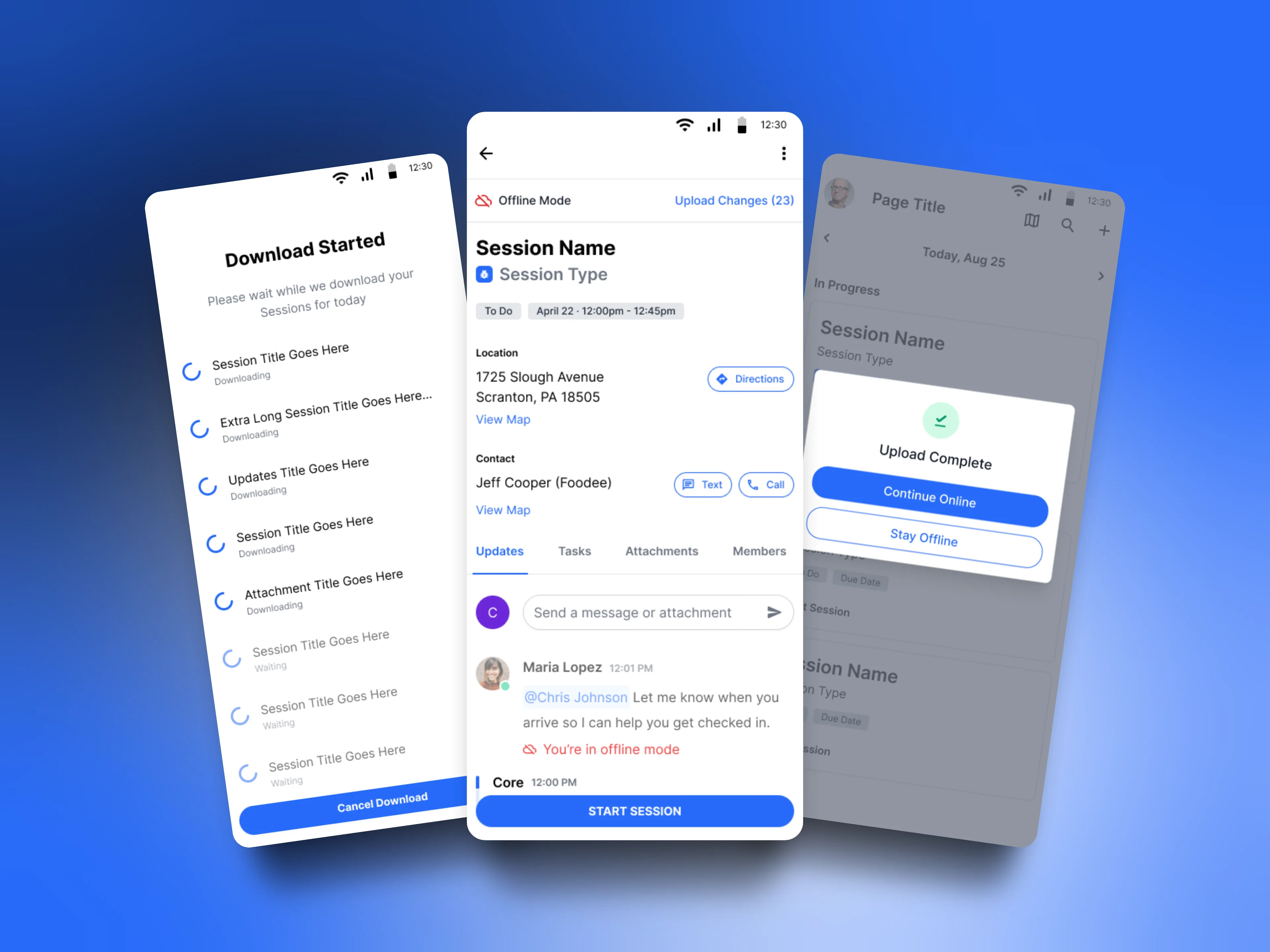
Before heading into the field, users explicitly initiate a download of their session data. No automatic background syncing, the download is a deliberate action with clear progress states so the user knows exactly what's been captured before they lose connectivity. Once complete, the offline banner persists across the entire app as a constant reminder of the current data state.
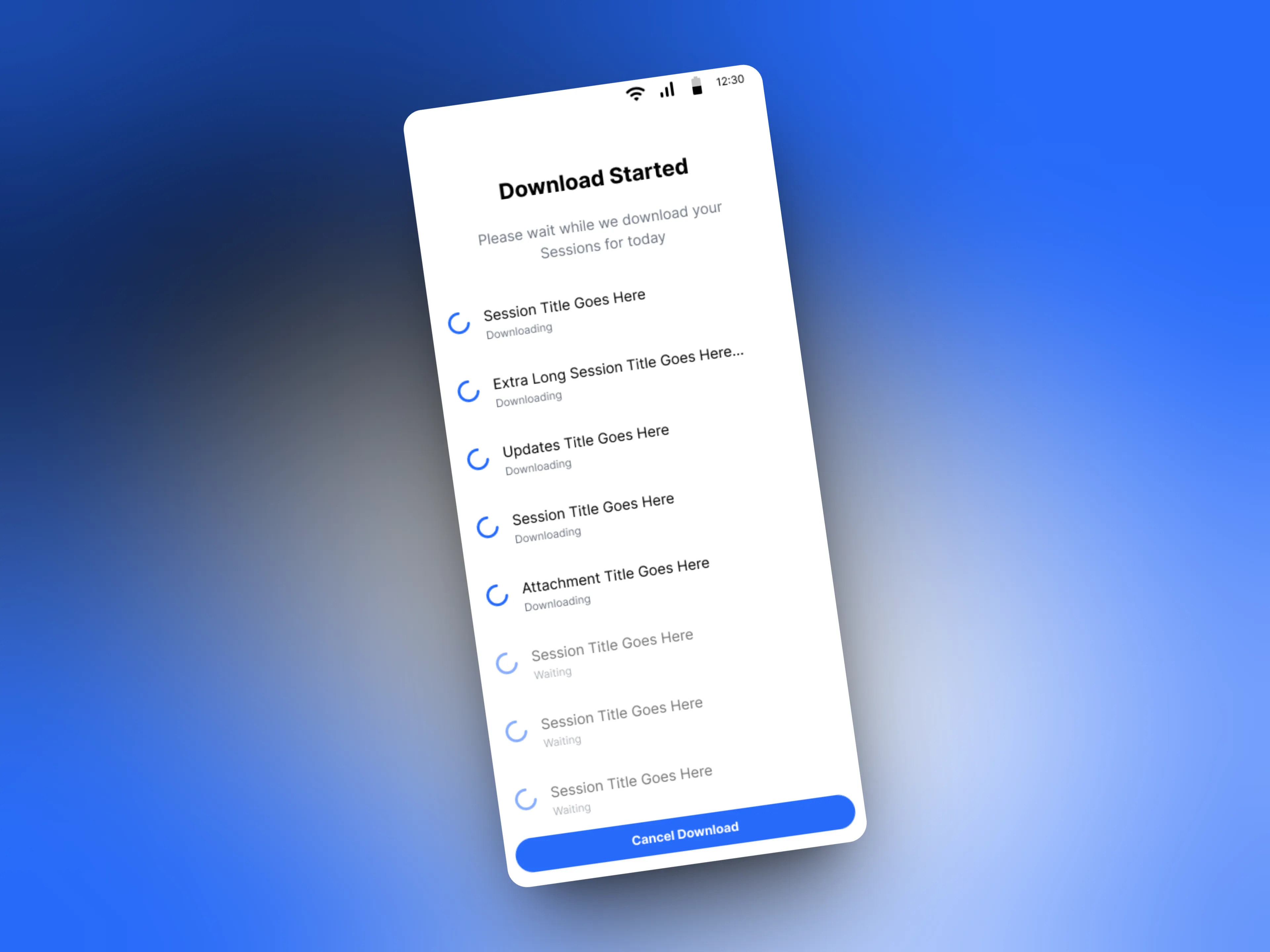
A large group photo of diverse team members gathered in an industrial-style space with arched ceiling.

Download started state showing session data being captured.
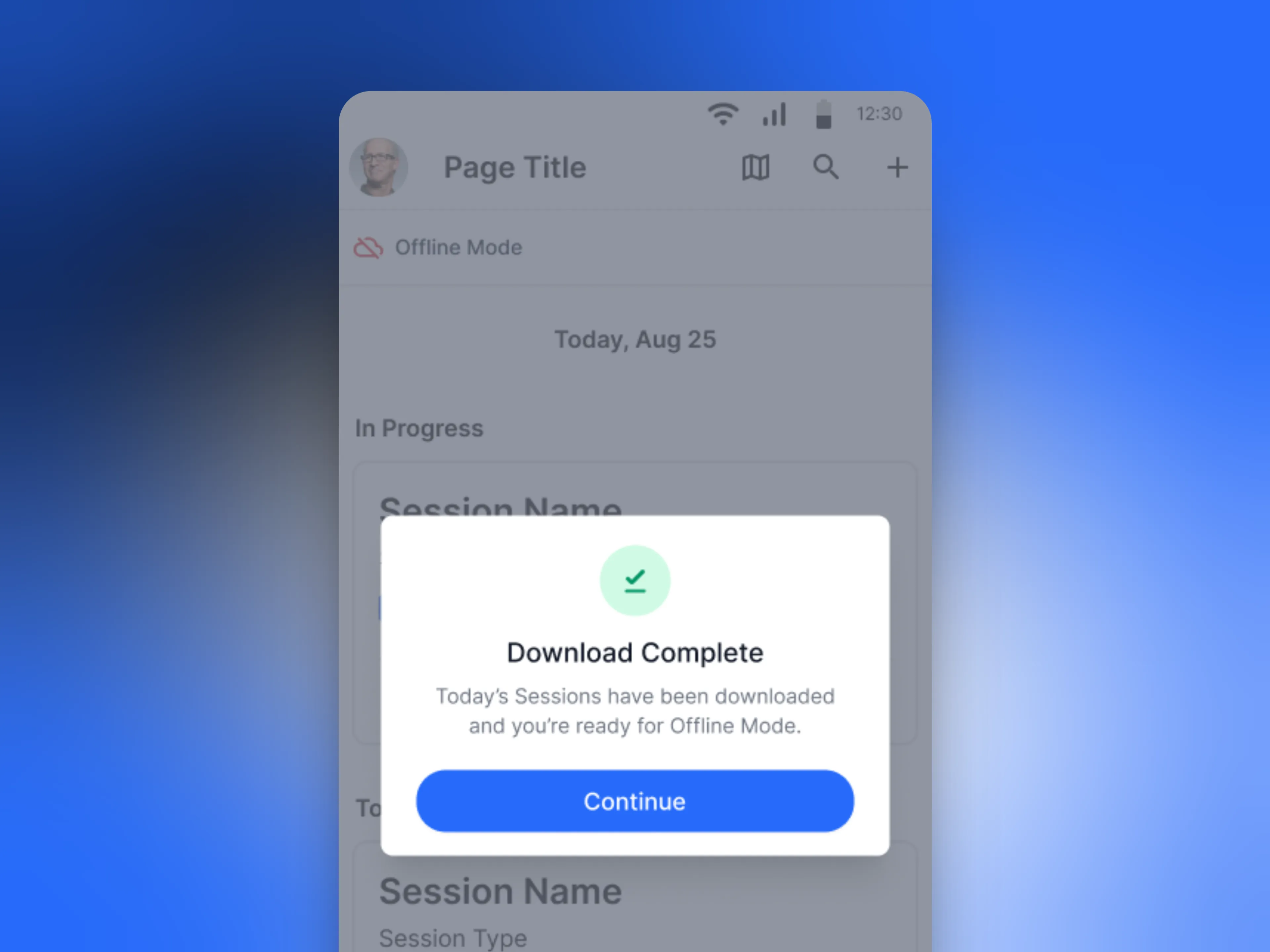
A large group photo of diverse team members gathered in an industrial-style space with arched ceiling.

Download complete confirmation, user is ready to work without connectivity.

Working Offline

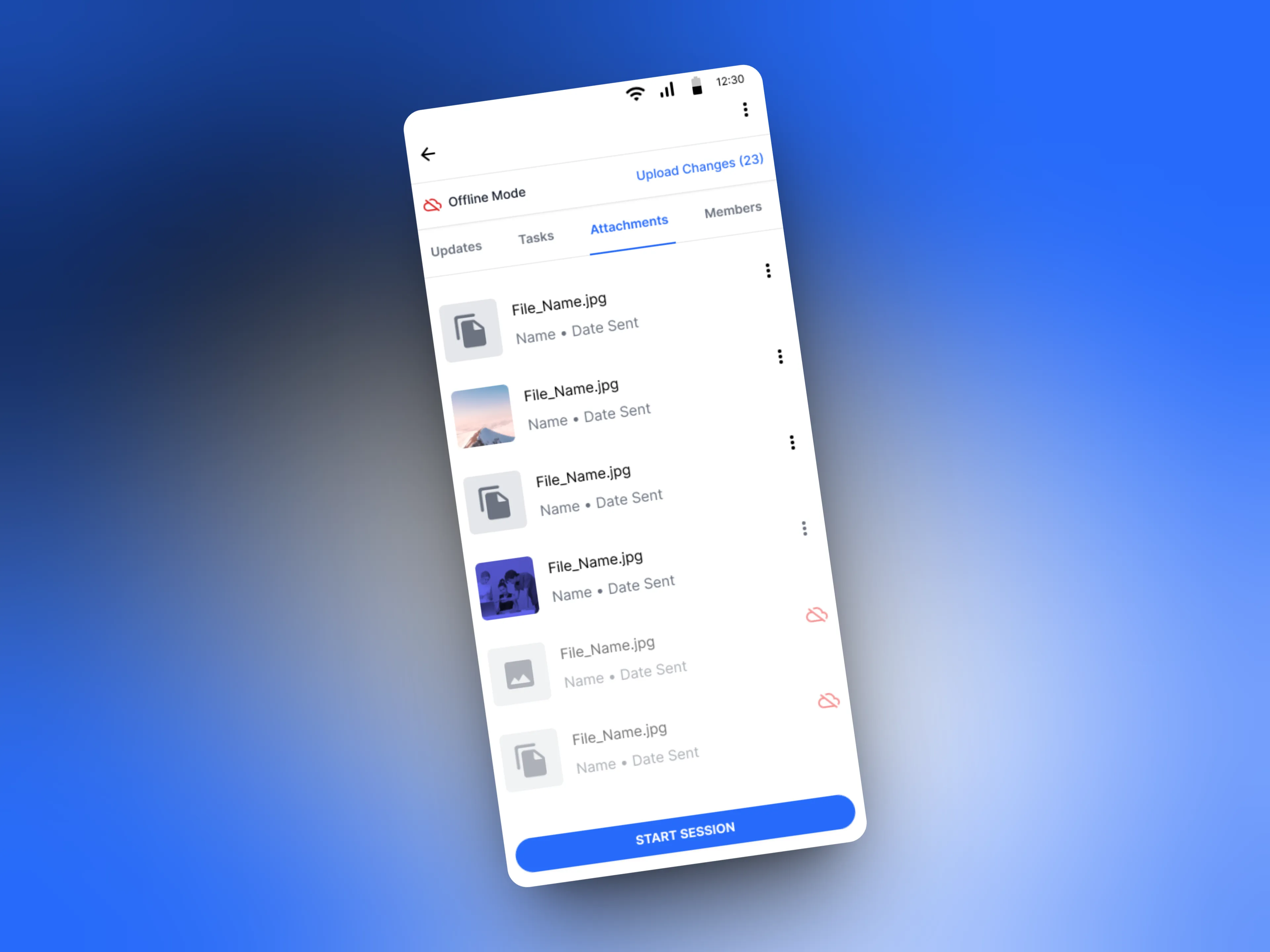
With connectivity gone, the app keeps working. Field workers can complete forms, submit updates, and progress through sessions normally. Any changes made offline are flagged with visual indicators so nothing gets confused with already-synced data. The experience doesn't degrade, it just operates within a clearly communicated set of boundaries.
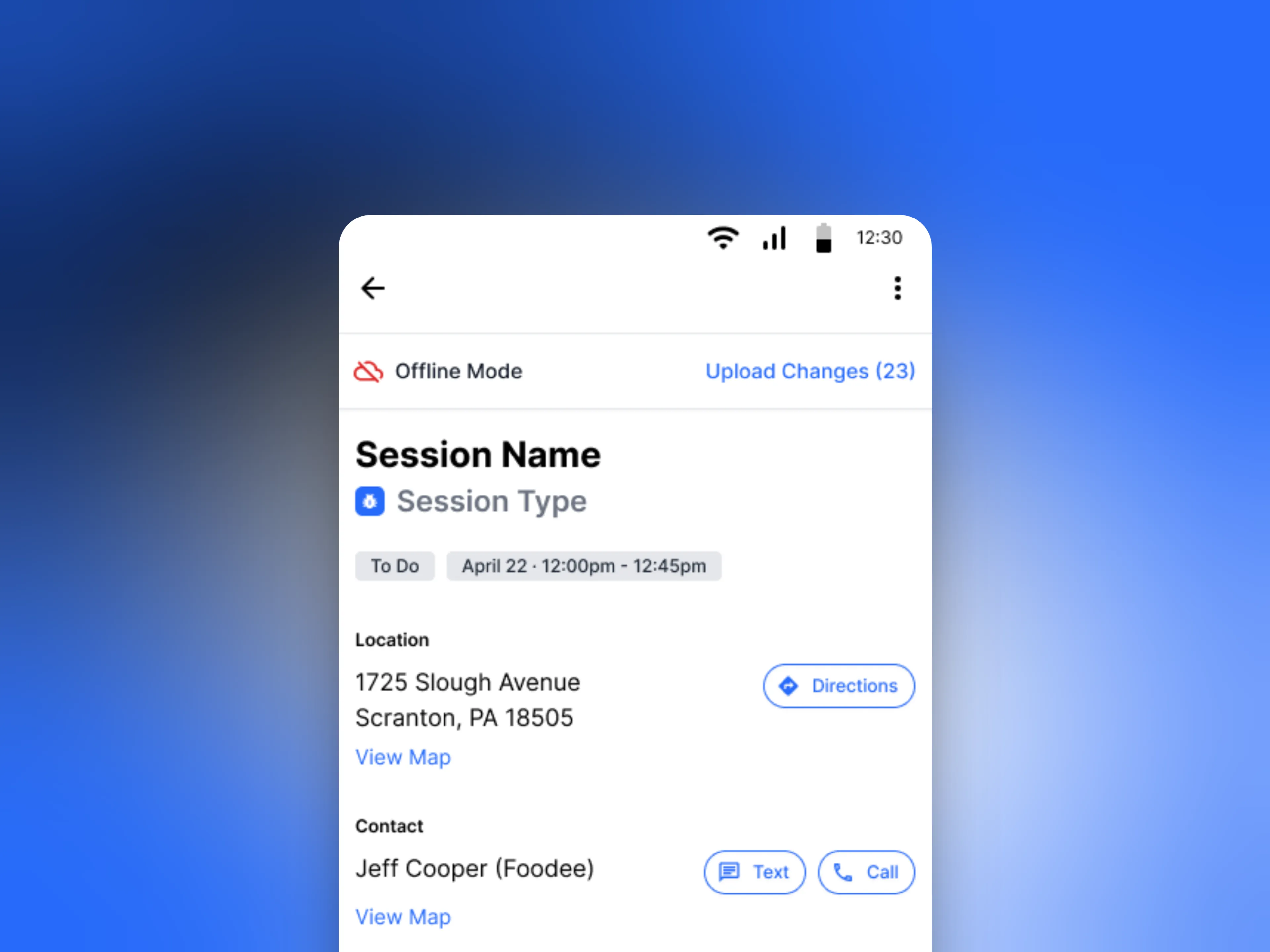
A large group photo of diverse team members gathered in an industrial-style space with arched ceiling.

Session view with persistent offline banner and upload changes indicator.
A large group photo of diverse team members gathered in an industrial-style space with arched ceiling.

Attachments tab showing unsynced files flagged for upload.

Coming Back Online

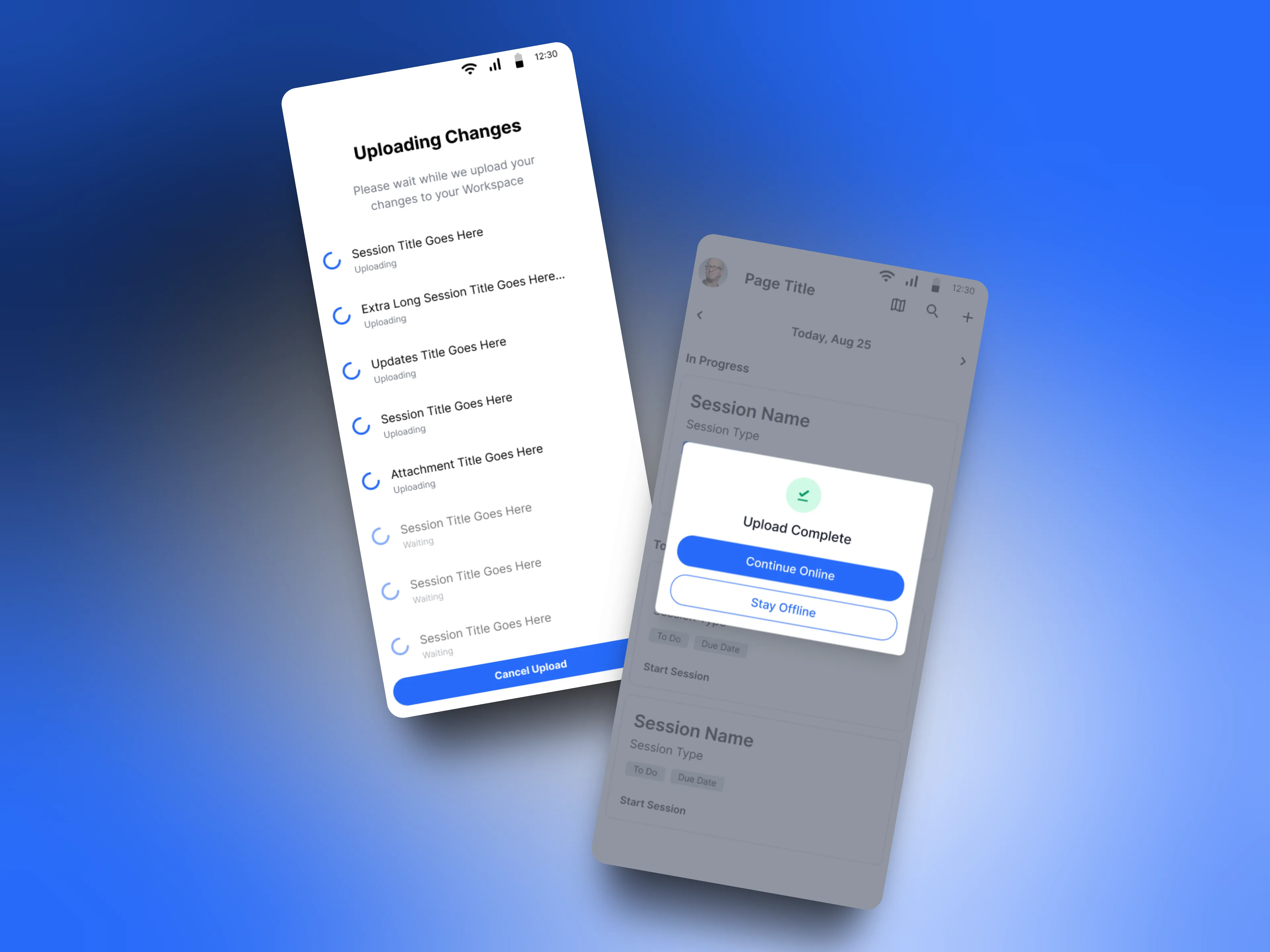
When connectivity returns, the app doesn't sync automatically. The user initiates the upload, reviews what's queued, and confirms before anything goes. If an upload fails, retry states and failure indicators surface immediately, no silent errors, no lost data. The field worker stays in control of their data from the moment they go offline to the moment everything is confirmed uploaded.
A large group photo of diverse team members gathered in an industrial-style space with arched ceiling.

Uploading changes state with per-item progress, followed by upload complete confirmation with option to continue online or stay offline.
Outcomes

Outcomes

Offline Mode shipped to beta clients within four weeks of project start. Paper forms were replaced in the field, the primary goal from day one. Customer Success reported strong positive feedback from beta clients, and the reliability of the sync system held up under real field conditions.

The impact went beyond feature adoption. Field workers trusted the app in environments where they previously wouldn't. That trust, earned through clear data states and zero silent failures, was the real measure of success for a feature built entirely around reliability.

Offline Mode shipped to beta clients within four weeks of project start. Paper forms were replaced in the field, the primary goal from day one. Customer Success reported strong positive feedback from beta clients, and the reliability of the sync system held up under real field conditions.

The impact went beyond feature adoption. Field workers trusted the app in environments where they previously wouldn't. That trust, earned through clear data states and zero silent failures, was the real measure of success for a feature built entirely around reliability.

Four weeks. Zero silent failures. Paper forms retired.

Four weeks. Zero silent failures. Paper forms retired.

A large group photo of diverse team members gathered in an industrial-style space with arched ceiling.

Three key states of the offline workflow: download, active session, and upload complete.

space cowboy

Have a project in mind?

By submitting, you agree to our Terms and Privacy Policy.

© 2025 Space Cowboy Design

Let’s talk.

If you're working on a product or have a new idea, I'd love to hear about it.

Quick response.

If you’re ready to create and collaborate, we’d love to hear from you.

No pressure.

No pitches or sales, just a conversation.

space cowboy

Have a project in mind?

By submitting, you agree to our Terms and Privacy Policy.

Let’s talk.

If you're working on a product or have a new idea, I'd love to hear about it.

Quick response.

If you’re ready to create and collaborate, we’d love to hear from you.

No pressure.

No pitches or sales, just a conversation.

space cowboy

Have a project in mind?

By submitting, you agree to our Terms and Privacy Policy.

© 2025 Space Cowboy Design

Let’s talk.

If you're working on a product or have a new idea, I'd love to hear about it.

Quick response.

If you’re ready to create and collaborate, we’d love to hear from you.

No pressure.

No pitches or sales, just a conversation.